Category Archives: Languages

Moar Phidgeting

  • Brought in my fine collection of jumpers and connectors. Next time I won’t have to build a jumper cable…
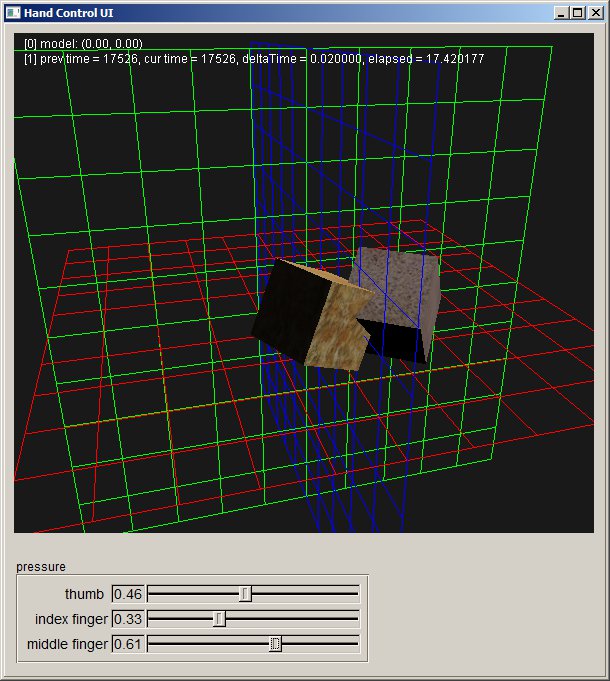
  • Built the framework for the new hand test. The basic graphics are running
  • Added cube code to the FltkShaderSupport library. Here’s everything running:
  • KF_framework
  • Next, I’m going to integrate the Phidget sensor code into the framework, then hook that up to sound code.
  • Had Dong register for Google’s Ingress, just to see what’s going on.
  • Loaded in the Phidgets example code and the library that works is the x86 library. Using the 64bit library results in unresolved externals errors.
  • There are a lot of straight C examples. Just found the C++ class examples simple.h and simple.cpp.

I may be done coding this thing. Time for a pilot study.

I was going to have a demo for upper management of my company, but the VP of R&D got waylaid by travel issues and had to postpone. So that gave me a few additional hours to do XML parsing things and generally fix up the application. This is what a study looks like:

<?xml version="2.0" encoding="ISO-8859-1"?>
<Setup>
 <ResearcherName>Some Researcher</ResearcherName>
 <SubjectName>Some Graduate Student</SubjectName>
 <SubjectAge>23</SubjectAge>
 <SubjectGender>Male</SubjectGender>
 <Seed>0</Seed>
 <SpeedTests>3</SpeedTests>
 <AccuracyTests>3</AccuracyTests>
 <Sessions>2</Sessions>
 <SoundFile>C:/Wavs/heli.wav</SoundFile>
 <SoundFile>C:/monoExport.wav</SoundFile>
</Setup>

So now I have a release build that can create ad-hoc sessions or read in a test session from an xml file. The results from the test is output to a csv file where the position of the source(s), the position of the cursor, the angle between them, and the time to act are all recorded. In addition, the number of speakers used is determined and the normalized volume to each channel is recorded. So yay.

I suppose that the next step with the code would be to set the speakers explicitly, rather than letting the API determine the volume, but I think that would be another study. And I should add comments before I forget why I wrote things the way I did (wstring wst(str.begin(), str.end());, I’m looking at you…)

For the pilot study, I’m going to team up with Brian to go and find all the relavent previous work and set up the study. I’m pretty sure that we’re covered by one of Ravi’s IRBs, so I think that collecting data can begin as soon as a machine is set up in the lab that we can use.

And while that’s cooking, I can now use my shiny new audio library to hook up to the telepresence simulator. Woohoo!

 

Bells and Whistles. More like not-quite-essential functionality…

It was one of those days where work interfered with development. How inconvenient. I shake my fist at the power of the paycheck. Damn you!

  • Made sure that the telepresence demo was working. I need to get back to that!
  • Adding XML parsing of setup files.
  • Reading in files with newfangled std::ifstream. Fun!
  • Using rapidxml, which is working just fine, but suffering from cryptic documentation. I wasn’t sure how to get child nodes until I found this post. It looks like a small library of navigation functions might be useful. Considering there is rapidxml_iterators.hpp and rapidxml_utils.hpp I’ll look there first.

On the plus side, my house didn’t explode

Not much to report today, the gas people were running new lines to my house. It seems they do that once a century, if it needs it or not. With all the hardware at work, it makes developing at home pretty much a no go.

  • Did verify that the release builds work with the end-user DirectX install
  • Added text to emitter position on the graphics screen
  • changed the timer to to std::chrono::high_resolution_clock (check the bottom of this post for an example)
  • It looks like MSVC 2010 doesn’t have <chrono>. Made do with clock_t and clock() instead.
  • Added xml output for test setup. Why does ctime() return a string with a line feed!?

vector<tuple<float, float, string>>::iterator it = sourcePositions->begin();

C++ is like being in a candy store, full of a huge variety of bright, shiny treats that can blow your hand off if you don’t pay attention.

  • Finishing up adding multiple sound capability per test attempt. Because I’ve been away from C++ for a while and I like to try new things, I poked around with tuples for a while, which are kind of neat. Then I decided to put them into a vector and access them. That lead to code like this:
    • vector<FOURF_SAMPLE_TUPLE>::iterator it = myVector.begin();
      while(it != myVector.end()){
      	float sourceX = get<EMITTER_X>(*it);
      	float sourceY = get<EMITTER_Y>(*it);
      }
    • That is *not* the most intuitive code I’ve seen. I mean, it makes sense, and given the limited set of overloadable characters, ok. But I think “[” and “]” would have been a better choice than “<” and “>”.
  • Got the multi sound playing and the results output to .csv. Next is to get the xml setup files running.

Pulling everything apart and putting it back together

  • Adding multiple sound playback
    • Rework the output to handle multiple sounds. This means one TestResult per sound. However, the result cannon be associated with a sound, so for each release, all the emitter sources will have to be included. Later analysis can be used to determine the best fit. Note also that the number of attempts may be greater or lesser than the number of emitters.
  • Need to use the XML to write out and read in just the configuration values
  • Need to save multiple source positions in TestResult. Added bad code at the point to continue.

Enhancements

  • Meeting with Dr. Kuber.
    • Add a “distance” component to the test and a multiple emitter test
    • Got a bunch of items to add actuators to: Hardhat, noise-blocking headphones, and a push-to-talk mic.
  • Added name and gender fields to the GUI and cleaned up the menus
  • Working on adding multiple sounds
    • Added a ‘next’ button. Once pushed, the sources can show until the center is clicked again.
    • I think the test should have options for how the sounds are added
      • Permutations (A, then B, then C, then AB, AC, BC, ABC)
      • All (Going to start with this)
      • Random?
  • Added variable distance

Infrastructure

So the testing part of the code is done and working. Yes, there are bugs, and some cases where exceptions are thrown that should be handled, but if you color inside of the lines, everything works. Of course, now I need to be able to record the output, so it’s time for some classes to handle the work of saving results for analysis.

  • Creating a TestResult class with the following information
    • session number
    • test number
    • test type (speed or accuracy)
    • time to lift
    • source position
    • cursor position
    • angle difference
    • speaker volume matrix
    • Also, there will be a toString(), toCsvString(), and  toXmlString() method for output;
  • The TestManager will instance and store TestResults in a container (vector?), which will have the additional fields
    • Researcher name
    • Subject name
    • Sound file
    • Total sessions
    • Speed tests per session
    • Accuracy tests per session

So that’s what happens when a programming language gets old…

  • Continuing with the test exec. I’m also going to need a class that records the data associated with each test segment.
  • Ran into a… Well, I don’t want to call it a bug. Let’s say that C++ is showing its age. FLTK uses char*. Most of Windows uses wchar_t. They don’t play well together, so I spent about half of my time working out the best way to convert between them. It’s this:
  • void setSoundFileString(LPCWSTR wps){
    	soundFileString = new wstring(wps);
    	string str(soundFileString->begin(), soundFileString->end());
    	sprintf_s(soundFile, "%s", str.c_str());
    }
  • I mean really!? Good grief.
  • Got a lot of the exec built and running. Clicking on the center button fires the sound, and you can drag to where you think the sound is. I am not all that accurate. It could be a frequency thing though. I’m running a low 10-20 HZ signal. The test should definitely try different frequencies.

FLTK and FLUID. Simple, Good Stuff

  • Starting to put together the actual test framework. Found a good open source synthesizer (ZynAddSubFX) that I used to create a pure tone that I then cut down to one second with Audacity. It’s important to note that this app only works with MONO sounds.
  • Building up the class that will handle running multiple sessions.
  • Just a quick shout out to FLTK. I have been adding and adjusting the GUI all day long as I figure out how to run the tests. To add fields, adjust positions and just generally futz around, all I have to do is use the FLUID gui IDE, export the layout as C++ code, add in stdafx.h and compile. It all just works. A great piece of code. FLTK_rocks