What you get when you combine FLTK, OpenGL, DirectX, OpenHaptics and shared memory

Wow, the title sounds like a laundry list 🙂

Building a two-fingered gripper

Going to add sound class to SimpleSphere so that we know what sounds are coming from what collision. Didn’t do that’ but I’m associating the sounds by index, which is good enough for now

Need to calculate individual forces for each sphere in the Phantom and return them. Done.

To keep the oscillations at a minimum, I’m passing the offsets from the origin. That way the loop uses the device position as the basis for calculations within the haptic loop.
Here’s the result of today’s work:

Flailing, but productive flailing.

Basically spent the whole day figuring out how the 4×4 phantom matrix equates to the rendering matrix (I would have said OpenGL, but that’s not true anymore. I am using the lovely math libraries from the OpenGL SuperBible 5th Edition, which makes it kinda look like the OGL of Yore.

Initially I thought I’d just use the vector components of the rotation 3×3 from the Phantom to get the orientation of the tip, but for some reason, parts of the matrix appear inverted. So instead of using them directly, I multiply the modelviewmatrix by the phantom matrix, Amazingly, this works perfectly.

To make sure that this works, I rendered a sphere at the +X, +Y and +Z axis in the local coordinate frame. Everything tracks. So now I can create my gripper class and get the positions of the end effectors from the class. And since the position is in the global coordinate frame, it kind of comes along for free.

Here’s a picture of everything working:
PhantomAxis
Tomorrow, I’ll build the gripper class and start feeding that to the Phantom. The issue will be to sum the force vectors from all the end effectors in a reasonable way.

Some Assembly Required

Integrating all the pieces into one test platform. The test could be to move a collection of physically-based spheres (easy collision detect) from one area to another. Time would be recorded from the indication of a start and stop (spacebar, something in the sim, etc). Variations would be:

  • Open loop: Measure position and pressure, but no feedback
  • Force Feedback (Phantom) only
  • Vibrotactile feedback only
  • Both feedbacks

Probably only use two actuators for the simplicity of the test rig. It would bean that I could use the laptop’s headphone output. Need to test this by wiring up the actuators to a micro stereo plug. Radio Shack tonight.

Got two-way communication running between Phantom and sim.

Have force magnitude adjusting a volume.

Added a SimpleSphere class for most of the testing.

WTF?!

Had an idea to fix a messy bug.
Searched for “MSVC shared memory”
Got a useful hit in the MSDN database.
Implemented in a test loop. Worked the first time
Implemented in the project code. Worked the first time.

I think the world is about to end.

Shared Memories

Today’s job is to integrate the Phantom code into the simulation.

  • Code is in and compiling, but there are mysterious errors:
  • HD_errors
  • HD_errors2
  • I think I need a more robust startup. Looking at more examples….
  • Hmm. After looking at other examples, the HD_TIMER_ERROR  problem appears to crop up for anything more than trivially complex. Since both programs seem to run just fine by themselves, I’m going to make two separate executables that communicate using Named Shared Memory. Uglier than I wanted, but not terrible.
  • Created a new project, KF_Phantom to hold the Phantom code
  • Stripped out all the Phantom (OpenHaptics) references from the KF_Virtual_Hand_3 project;
  • Added shared memory to KF_Phantom and tested it by creating a publisher and subscriber class within the program. It all works inside the program. Next will be to add the class to the KF_VirtualHand project (same code, I’m guessing? Not sure if MSVC is smart enough to share). Then we can see if it works there. If it does, then it’ll be time to start getting the full interaction running. And since the data transfer is essentially memcpy, I can pass communication objects around.

Dancing Phantoms

Spent most of the day trying to figure out how to deal with geometry that has to be available to both the haptic and graphics subsystems. The haptics subsystem has to run fast – about 1000hz and gets its own callback-based loop from the HD haptic libraries. The graphics run as fast as they can, but they get bogged down.

So the idea for the day was to structure the code so that a stable geometry patch can be downloaded from the main system to the haptics subsystem. I’m thinking that they could be really simple, maybe just a plane and a concave/convex surface. I started by creating a BaseGeometryPatch class that takes care of all the basic setup and implements a sphere patch model. Other inheriting classes simple override the patchCalc() method and everything should work just fine.

I also built a really simple test main loop that runs at various rates using Sleep(). The sphere is nice and stable regardless of the main loop update rate, though the transitions as the position is updated can be a little sudden. It may make sense to add some interpolation rather than just jumping to the next position. But it works. The next thing will be to make the sphere work as a convex shape by providing either a flag or using a negative length. Once that’s done (with a possible detour into interpolation), I’ll try adding it to the graphics code. In the meanwhile, here’s a video of a dancing Phantom for your viewing pleasure:

Random bits

I think I know what the vibroacoustic study should be. I put an actuator on the Phantom and drive wav files based on the material associated with the collision. I can use the built-in haptic pattern playback as a control. To make the wav files, it might be as simple as recording the word, or using a microphone to contact a material, move across it and lift off (personally, I like this because it mimics what could be done with telepresence. The use of multiple sensor/actuator pairs can be used in a later study.

Which means that I don’t actually need the Phidgets code in the new KF hand codebase. I’m going to include it anyway, simple because I’m so close and can use it later.

Come to think of it, I could put an actuator on a mouse as well and move over materials?

Tasks for today:

  • Finish getting the Phidgets code working in KF_Hand_3 – done
  • Start to add sound classes – done inasmuch as sounds are loaded and played using the library I wrote. More detail will come later.
  • Start to integrate Phantom. Got HelloHapticDevice2 up and running again, as well as quite a few demos

Moar Phidgeting

  • Brought in my fine collection of jumpers and connectors. Next time I won’t have to build a jumper cable…
  • Built the framework for the new hand test. The basic graphics are running
  • Added cube code to the FltkShaderSupport library. Here’s everything running:
  • KF_framework
  • Next, I’m going to integrate the Phidget sensor code into the framework, then hook that up to sound code.
  • Had Dong register for Google’s Ingress, just to see what’s going on.
  • Loaded in the Phidgets example code and the library that works is the x86 library. Using the 64bit library results in unresolved externals errors.
  • There are a lot of straight C examples. Just found the C++ class examples simple.h and simple.cpp.

Phidget about

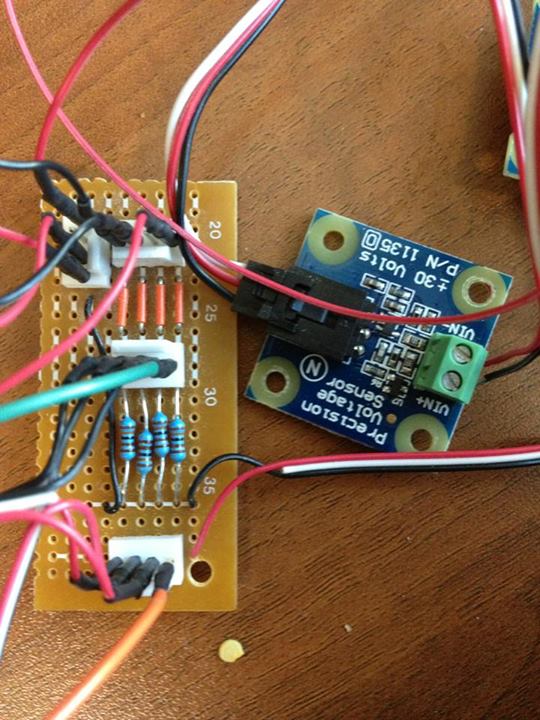
Yesterday, I got the sensor resistance converted to voltage using this nifty tutorial from Sparkfun. A 1k ohm resistor seems to work best, since I want most of the sensitivity to be light pressure.

Today, the goal is to build a circuit with three channels that connects to the Phidgets voltage sensor. The only thing I’m wondering is if I’ll get the resolution with the voltage range I’m getting – Zero to about 2.5 volts. I’m estimating that I should get about 1500 – 3000 steps out of that, assuming -30v to +30v is resolved to a (unsigned?) 16-bit int.

Done!

ratsnest

Pilot Study and Telepresence.

Brian came over last night and we were able to load up his laptop with the drivers and software and run examples. At this point, we’re looking at three things to study with the rig:

  1. What is/are the best frequencies for spatial orientation (position and distance) using these actuators?
  2. What happens with speed and accuracy when there are more than one signal?
  3. Do 7 actuators work better than 4?

We’re in the process now of writing up the test plan. In the meantime, I’m now going to try to adapt the Audio2X software to replace the synthesizers and use a Phidgets 1019 to replace the Ardino of the previous telepresence test rig. Once that’s done, then I’ll add in the Phantom. For reference, here’s a video of the first version running:

And here’s a picture of the latest interface that will be attached to the Phantom:

IMG_1444To move this along, I’ve brought a small pile of electronics in from home. Tomorrow’s goal is to make sure that I can connect to the interface board. Once that’s working I need to hook up the sensors from the old prototype (note! Bring in crimping pins for female DB15 connector!).