Category Archives: Sound

Standard programming mysteries.

I hate it when I’m starting off with an API and the tutorials don’t work.

I was working with the LWJGL OpenAl examples described in earlier posts, and could not get the audio files in the examples to open. The file was there, it could be converted to an InputStream, but when I tried creating a LWJGL WaveData object, the underlying java audio code would throw an error and I’d get a null object.

So since I’m now trying to figure out what gives with the javax.sound.sampled.* system, I might as well see if I can do what I want to do here. So off we go to the Internet once more, looking for examples that work.

The first thing I found was the Oracle Java Sound API documents, which are huge, loaded with theory and very little code. I’m not complaining really, because they look like they will be really useful when I have a little bit of code working. But there needs to be a “Hello, World”.

Which showed up after a bit of searching. There is a website JSResources, put together by two German (?) developers; Florian Bomers and Matthias Pfisterer. It is loaded with examples that seem to work. I’ve just gotten one of their simple examples running with a minimum of fuss. (Here’s the (slightly) modified code).  Since this is straight sound library, we know that we can run all the channels. Now we just need to get from here to there.

Multichannel sound

It was looking like Java3D only handled Mono and stereo, but I just found com.sun.j3d.audioengines.javasound .JavaSoundMixer, It also uses javax.media.j3d.PhysicalEnvironment, which looks like it has built-in head tracking.

Darn it – got my hopes up too soon: “While the sound image created for final output to the playback system is either only mono or stereo, most device driver implementations will mix the left and right image signals generated for each rendered sound source before outputting the final playback image. Each sound source will use N input channels of this internal mixer. Each implemented Java3D audio device driver will have its own limitations and driver-specific characteristics. These include channel availability and usage (during rendering). Methods for querying these device-driver specific characteristics are provided.” (from javax.media.j3d.AudioDevice)

OK, I’m not ready to give up on Java yet. According to this bug report, multichannel support has been working for a while. My two options at this point are OpenAl through the LWJGL folks, and the javax.sound.sampled library.

Because I’d like to show graphically where the sounds are coming from, I’m going to try the LWJGL approach first.

Looks like multichannel support is in OpenAl, but will require care: “The multi-channel extension provides a mechanism to play multi-channel data via OpenAL. A variety of formats are supported. Multi-channel buffers can be attached or queued on a source. Note that when using the “Generic Software” device, the multi-channel buffers are mixed down to a stereo output. On a hardware device (such as the “Generic Hardware” device or a native device), each channel of a buffer requires a hardware voice. So, for example playing a buffer using the AL_FORMAT_51CHN16 format will require 6 free hardware voices. If the hardware resources are unavailable, the call to alSourceQueueBuffers or alSourcei will fail.”


And then there’s Javascript….

It turns out that there is a good deal of work going on in bringing multichannel audio to your browser. Since this *is* the future, it’s not a thing that I want to overlook, but I don’t want to put all that much time into it right now either. So here are some links:

Eight channels of sonic goodness

After a frustrating couple of days trying to get my Vantec USB Dolby 7.1 unit working, I gave up and sent it back to Amazon. Who, I must say, in their vast, impersonal way, really did a good job. The new replacement unit was on its way and arrived the day I sent the old unit back on their dime. Pretty impressive.

After letting the device sit in its box for a while as I worked up the energy to try something that I suspected would not work, I finally tried it this morning, and it works like a charm. Yay! Now I noticed something different, so it’s possible that the old unit worked fine.

When I plugged in the new controller, I happened to notice that there was a new icon in my system tray:

And what does this do?

And what does this do?

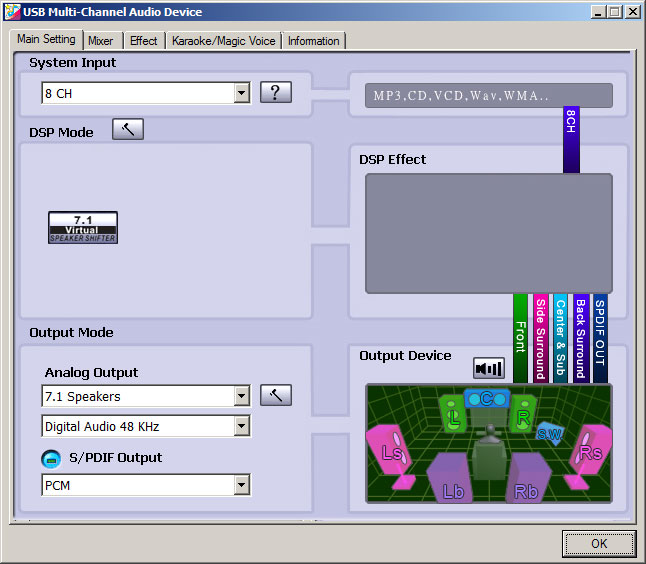
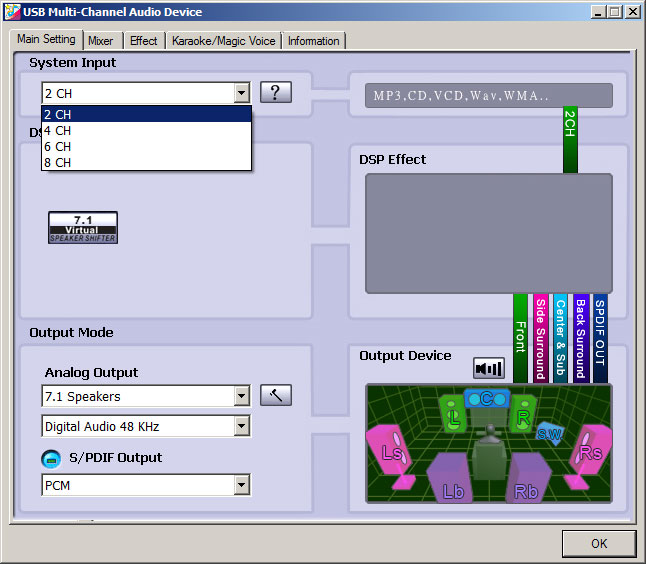
Clicking the icon brought up a tool that I hadn’t seen before:

2 Channel Config

2 Channel Config

Note that the System input seems to default to 2 CH, though 8 are available. More importantly, on the right side of the screen note that the “DSP Effect” seems to be getting 2CH data that it then sends to all the speakers. This was the behavior that I was getting that I couldn’t seem to fix.

Selecting “8 CH” in the combobox has the following effect:

8 channel configuration

8 channel configuration

After making that change, I clicked on each of the speaker icons in the lower right image and was rewarded by a synthetic voice coming out of the appropriate helmet speaker. Hooray!

Now this configuration tool must have been installed with the device, but it wasn’t mentioned anywhere in the documentation and didn’t pop up in the install procedure. It looks like you just have to know that it’s there. I guess that’s not surprizing, in that all these USB systems use the same chipset, made by C-Media, and they wrote the driver.

Anyway, I now have a functioning system. I need to play around with the best way to have the actuators contact the user’s head, but I think that’s the last remaining hardware task.

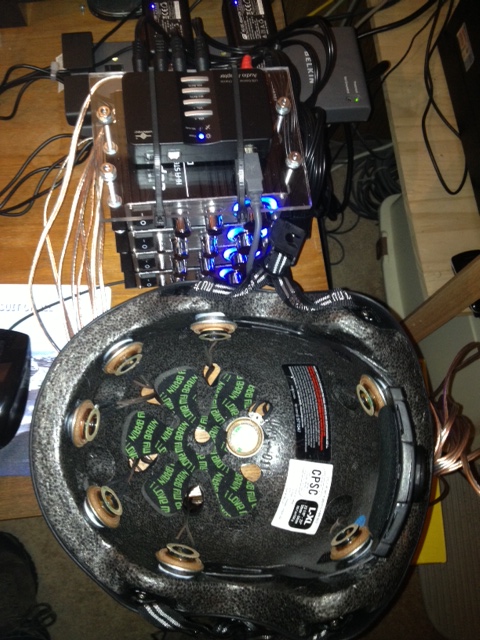
I’ve also finished getting the correct speaker lead to go to the correct amplifier, and cleaned up the wiring harness. Here’s a picture of the leads coming off the helmet:

The latest style in HCC

The latest style in HCC

I’m sure that no one would look twice at me walking down the street wearing that and four glowing amplifiers strapped to my back…

Done with wiring. Well, for now.

Today’s job was twofold – get all the speakers wired up and test everything as a unit, and if that works, get a cheap bike helmet to mount them all to.

8speakers

Eight Speakers and Blinky Lights

Testing was a breeze – it turns out that Windows has a nice control panel for configuring speakers:

SpeakerConfigAll I have to do is click on the speaker, which gives me a convenient tone. Otherwise, I’m not sure I ever would have been really sure as to which speaker was what.

Anyway, everything works. The next picture should be looking something like Rick Moranis  in Ghostbusters:

Early Proof-of-Concept

Early Proof-of-Concept

Ok, I’ve got the actuators mounted in the helmet and they work pretty well. The only problem is that the Dolby until is locked into stereo mode and I can’t seem to get it to think that it’s 7.1. Sigh. Guess that’s the problem for tomorrow…

wiredHelmet

Now with more wires

I managed to get all of the components hooked up around the amps today. Now I have the USB Dolby 7.1 decoder on top of the amp stack, with all four amps bolted together. I’m waiting to get a power strip that I can hook up all the power supplies too. But everything should have a nice blue glow when it’s plugged in. Tomorrow, I’ll hook up the speakers and see how it all sounds/feels.

IMG_1988[1]

Today’s laundry list

Not much progress, due to other classes, work, life-in-general. But I have a gap today so:

Meeting at PAD lab to discuss our cohort of projects

I’m going to swing by Home Depot on the way home today to get some .25″-ish threaded rod and nuts so that I can make a tiny rack for all the amps. They also sell Y-adapters, so I’ll pick up a few more of them. Pix by the end of the day, with luck.

And I came across this cool thing:  $59 pcDuino – AllWinner A10 Board with Arduino Compatible Headers. Here’s a picture:

And here we go – the world’s cutest 8-channel amp:

IMG_1987[1]

This looks interesting

First, I got the headset. Very nice.

Second, there is a company, sixense, that looks to be making some very good immersive hardware and a free(?) api. This might be very good for the pointing test. And they have some nice sound (midi) code too. It’s somehow tied up with Intel’s perceptual computing effort. I learned about this from a slashdotted article about the Holodeck Project.

Nasty bacteria

Bronchitis sucks. In a wheezy, “I need more air” kind of way. Anyway, the amps, actuators, and a Dolby headset are on their way and should arrive today. I’m going to take advantage of the fact that they are not here to work on getting these creatures out of my lungs.

Some times you get to push the Easy Button

Not much to report today, except that everything worked the way it was supposed to.

  • Dolby worked as plug-and play.
  • The small tactile actuator seems best.
  • The amp is powerful.
  • Java3D talks to at least two channels

So the next step is to get three more amps, six more actuators, and some kind of headgear. And maybe some kind of rigid helmet to attach the actuators to? I’m thinking I can use one of my old bike helmets to start with.

Anyway. Progress!